Please fix issue with WebDAV accounts not separated properly
Hello,
In the Textastic iOS app, I found that when I create multiple WebDAV connections with different account credentials, the app sometimes logs in with the wrong account.
Even though I entered different usernames and passwords, it connects using the credentials of a previously used account — possibly because the server or URL is the same. I’m not sure if it’s caused by identical URLs or just the same server.
Could you please fix this so that each WebDAV connection uses the specific account information entered, regardless of any shared URLs or servers? This issue makes it difficult to manage multiple accounts securely and correctly.
If needed, I can provide more detailed connection information or screenshots via email.
Thank you very much!

Graphical Artifact on Right Edge When Shifting Text Focus Left (iPhone 13 mini)

Issue: A graphical artifact appears on the iPhone 13 mini.
Details: The artifact starts at the right edge of the view and becomes visible when the text focus is moved to the left.
Steps to Reproduce:
- Open a screen with editable text.
- Place the text cursor near the right edge of the screen.
- Move the focus to the left.
- Observe the artifact appearing along the right edge of the view.
Second-to-last tab disappears on iPhone 13 mini
4598647982707891663.mp4The second-to-last tab disappears. The name of the tab doesn’t matter. The device is an iPhone 13 mini.
request body stream exhausted” Error When Overwriting File via WebDAV Upload
Hello,
I'm using WebDAV on a cPanel server and uploading files through the Textasic app.
Issue:
When a file named 'a.html' already exists on the server, and I try to upload another 'a.html' file to the same location, I get the following error:
Error uploading 'temp/a.html': request body stream exhausted
However, if I upload a folder that includes the same file (like 'b/a.html'), I receive a prompt asking whether to overwrite the file, and the upload completes successfully.
Question:
Is this an expected behavior in the Textasic app, or is it an upload failure?
Currently, overwriting individual files does not work. If there’s any known fix or workaround, I’d appreciate the guidance.
Thank you.
https://drive.google.com/file/d/1_MRtlpzsdkaO9PF-Dt2DB7EpxgwFTPOp/view?usp=drivesdk

 How to edit files (e.g. .txt) from the Files app directly in Textastic
Klicking on a .txt file opens this file in the Readdle Documents app. Is there a way to open it automatically in Textastic?


Sublime theme import
Hello! I'm excited to use Textastic on my iPhone 13.
I'm trying to import the gruvbox Sublime theme (https://github.com/Briles/gruvbox — specifically the "Dark Hard" color scheme), but nothing I've tried has made it appear in the Code Editor customization list, and I've tried many things, including unzipping the .zip into #Textastic, moving various pieces of said folder into and out of a "Templates" folder, renaming them with the folder and/or files with ".tmTheme" and ".tmbundle" extensions, etc…
The Textastic manual page on adding themes apparently isn't detailed enough for a newbie like me. Please, what exactly do I need to do to make this work?
Thank you!

TypeScript files no longer open
As of update 10.3, TypeScript (*.ts, which includes *d.ts) files no longer open on tap in Textastic.
1. Open Textastic app.
2. From home page (file explorer), navigate to a folder containing a TypeScript file, e.g. "Foo.ts".
3. Tap file "Foo.ts" to open.
Expected behavior: File opens for editing
Actual Behavior: File does not open. User remains in the file explorer folder view from which they tapped the file. The following error message is shown in an iOS alert modal dialog: Title: "Preview is not available for this file", Body: "Please make sure that the file has a valid file extension." Screenshot attached!
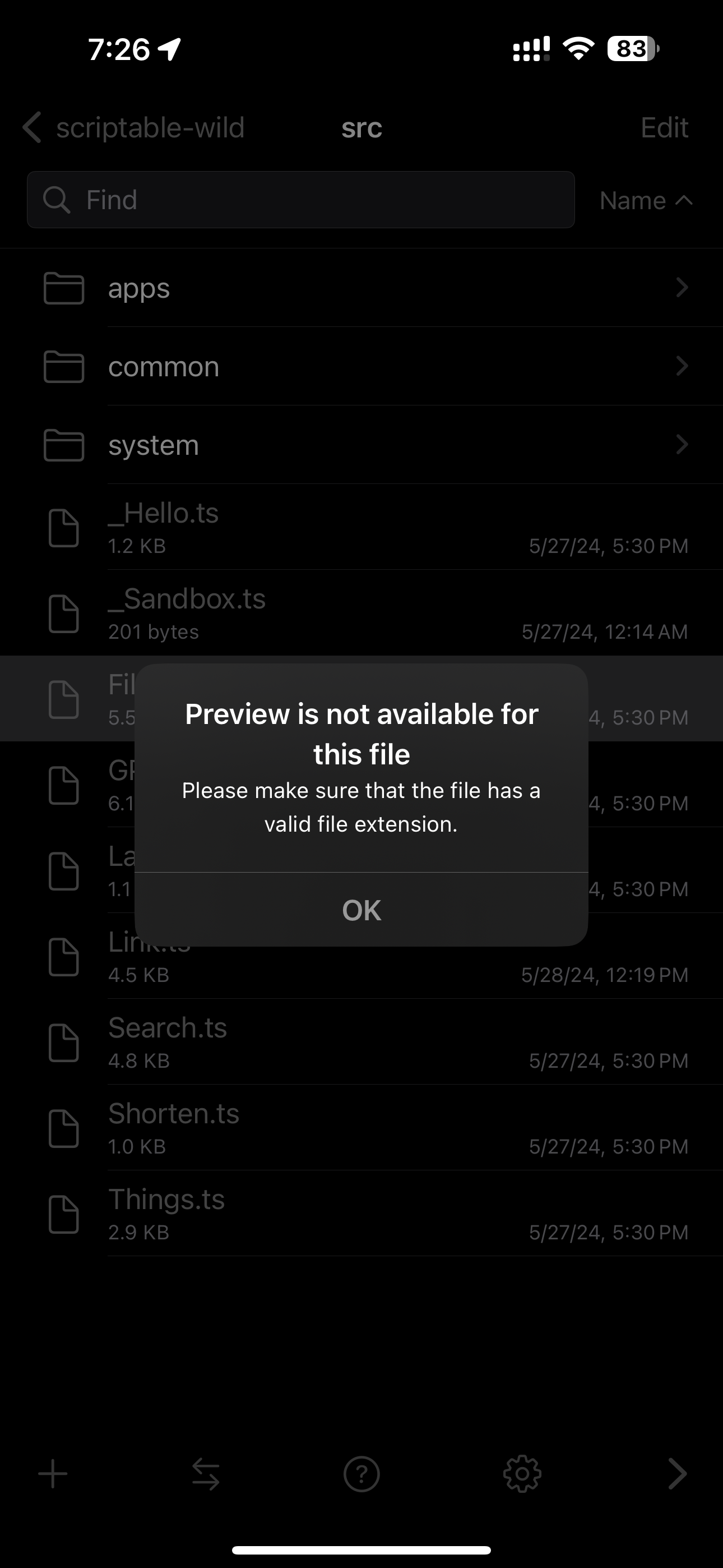
N.B. I am not surprised at the iOS modal dialog itself, because it is a well-known pain point that iOS and in fact macOS hostilely 😉 consider .ts to be some outdated MPEG transport stream file, rather than the ubiquitous TypeScript file (as someone with insider knowledge, Apple *hates* the idea of programming languages other than their own existing, unless they're hopelessly untyped (i.e. dumb, just how Apple would like their user base to stay to remain docile consumers) languages such as Python and JavaScript, but I digress). However, I can attest that this is new behavior in Textastic that began immediately after I intentionally installed the 10.3 update the morning it was released. I would assume the delta is not from the iOS 17.5.1 update since I also intentionally installed *that* the morning it was released and I think it was at least a few days ago.

Files from OneDrive
Hi!
So, i was considering buying this app but i need to know if i am going to be able to open files from OneDrive or Google Drive. If the "files browser" show something similar to the screenshot below. Thank you!

Customer support service by UserEcho