No similar topics found.

+5
 Matlab .m support
The syntax of typical script and function file type of Matlab is not interpreted correctly (eg, single quote when used as transpose is interpreted as unterminated string). This would be very helpful as other matlab types are listed as supported. Thanks, and please forgive if I have missed some ovbious remedy to this.

+5
Fixed
 Japanese characters are not rendered in the same size relative to riman text as other iPad apps
Japanese characters are so small that to be readable, the font size must be increased to the point the roman chacters are ridiculously large.

Answer
Alexander Blach (Developer)
15 years ago
This should now work correctly in the just-released version 3.0.

+5
Syntax Highlighting for Ansys APDL language
It would be really great, if Ansys APDL language would be supported. You can get an example from Notepad++ or VIM (sadly no fraise file). Thank you for your great app and for considering it.
+5
Optionally hide/don't show the tab character
Currently, Textastic always displays the tab character as a gray triangle. It should be possible to disable this in the app's settings.

+5
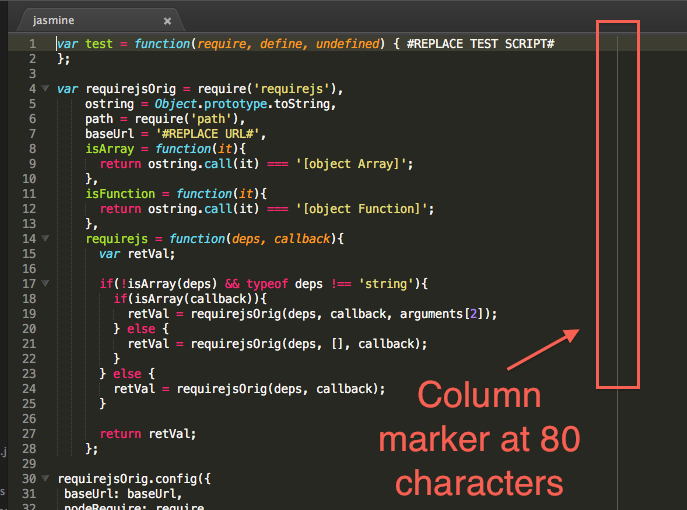
Add a vertical column marker
Add the ability to have a vertical column marker. It can be set to any column or use a default of 80 characters.
Example screenshot from Sublime Text 2 with a column marker set at 80 characters.

+5
Python for IOS support
Great APP!!!!! i would love to see "Open In" would work with the "Python for IOS" app. This would turn your Ipad into a powerful development environment

+5
Completed
Retina Display Support
I would be very appreciative if you could post an update with true retina display support. The app seems great, but there are a few things that are blurry, including the source text itself, regardless of which font I select.
Thanks for a great app, I plan to use it often!
Thanks for a great app, I plan to use it often!
Answer
Alexander Blach (Developer)
15 years ago
Version 4.0.1 with high resolution graphics optimized for the Retina display on the new iPad is currently waiting for review at Apple. Here's a full-size screenshot: http://www.textasticapp.com/images/textastic_retina.png

Answer
Alexander Blach (Developer)
16 years ago
I've added a "Read-Only" editor setting to the app's settings.
+5
Better hardware keyboard support
My iPad would completly replace my laptop, if Textastic had better support for hardware keyboard.. (iPad keyboard and bluetooth keyboard)
Keyboard shortcuts for saving, preview etc.
Keyboard shortcuts for saving, preview etc.

Customer support service by UserEcho

