Your comments

I'm seeing the same problem on my Mavericks machine. It seems to generate a wrong path and it looks to me like a bug in Mac OS X, but I'll have to investigate further.
Thanks for reporting this!
I don't know much about Fortran, but every online source I see when I search for "fortran comments" says that only an exclamation mark "!" starts a comment line.
I could find a reference to the asterisk comments in the wikipedia article on Fortran: http://en.wikipedia.org/wiki/Fortran#Obsolescence_and_deletions - it's the last line in the table on obsolete features in Fortran 90.
I assume that the since the syntax definition is called "Fortran - Modern" that it doesn't support legacy features like fixed from source code.

I'll consider adding it as an option.

The current version of Textastic doesn't have persistent undo history, sorry.
Hello,
that's actually the default behavior of Textastic.
Make sure that this feature is enabled in your system preferences. Under "General", the following option must not be checked:
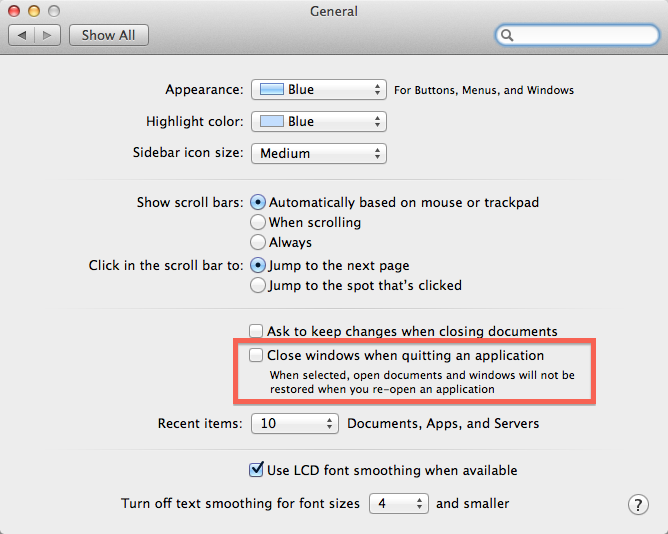
You can send a screenshot to support@textasticapp.com - thanks!
You should be able to edit PHP files with syntax highlighting, but the local preview doesn't interpret PHP.
Textastic offers syntax highlighting for many languages including PHP, but it doesn't include compilers or interpreters due to restrictions of iOS.
If you try to preview the php file locally, only the html part will be interpreted by the web view. The PHP part will be ignored.
In order to preview PHP in Textastic, you can upload the file to a test server, open the preview screen, switch from "Local" to "Remote" and enter the remote url of your test server.
Customer support service by UserEcho


Selecting the "Macintosh HD" from the "Where" dropdown menu in the save panel, then tapping on the "down arrow" button and the selecting the documents folder works for me. (in case you need a workaround)